Every Monday morning, I used to spend the first 30 to 40 minutes of my day doing the same thing: figuring out what was urgent, what could wait, and what I had forgotten to reply to the week before. As an IT Manager at a large company, my inbox is always a mix of SLA violations, vendor escalations, project updates, and the occasional email that quietly becomes a crisis by Wednesday.
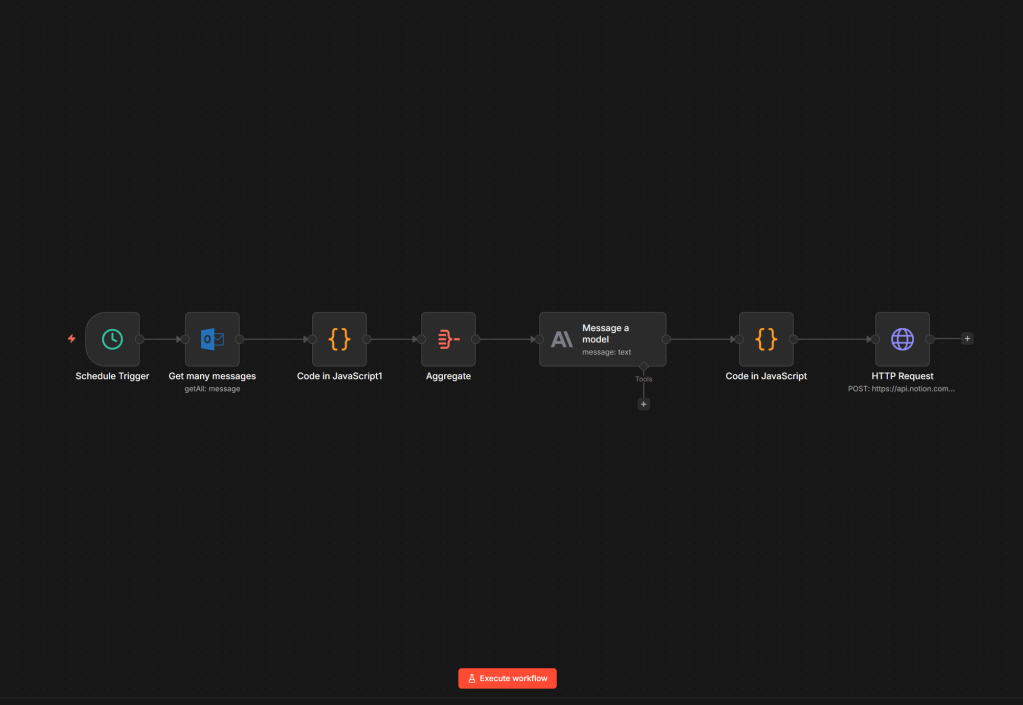
I decided to automate that. What I built is a weekly AI-powered email briefing that lands in my Notion workspace every Monday morning. It’s structured, prioritized, and ready to act on. It pulls from my Outlook inbox, uses Claude as the AI layer, and runs on n8n. No backend. No custom code deployment. No expensive SaaS tools.
But the most interesting thing I learned had nothing to do with the technology.
The stack
Four tools, one pipeline: Microsoft Outlook as the email source, n8n as the automation tool (self-hosted on my VPS), Claude via the Anthropic API as the intelligence layer, and Notion as the place where the report appears.
Every Monday at 8:00 AM, the workflow pulls every email from the past seven days, sends them to Claude for analysis, and writes a formatted report into a Notion database. The whole process takes under two minutes.
What the report looks like
The output is not just a list of emails. Claude produces a structured briefing with sections: critical items that need immediate action, medium priority follow-ups, low priority things to monitor, emails I sent that never got a reply, weekly metrics, and a to-do list for the week ahead.
When I open Notion on Monday morning, I already know what matters. I start the week oriented instead of confused.
Three things I had to learn the hard way
Prompt engineering is product design. The difference between a useful report and a useless one is not the AI model. It’s the prompt. I went through at least six versions. Being very specific about the format works much better than giving vague instructions. Telling Claude to use bullet points, limit to five items per section, and not repeat the same item across sections removed about 30% of redundant content and made the output actually usable.
The token problem is an architecture problem. Early on, I was sending a full week of raw email data to the API, including conversation IDs, full recipient lists, and thread metadata that added tokens without adding any value. I hit rate limits before I got useful results. The fix was simple: clean the data before sending it to the AI. Input size dropped by 70%. Output quality stayed the same.
Native nodes have limits; HTTP requests don’t. n8n’s Notion node is convenient but limited. For anything beyond basic field writes, using a raw HTTP request gives you full control over the Notion API. Once I made that switch, the block limit problem disappeared.
The pattern underneath
What I actually built is a simple pattern: pull data, remove noise, structure it with AI, write it to a knowledge base. The same approach works for almost any operational workflow: ticket briefings from an IT system, SLA monitoring, meeting note summaries, vendor communication tracking. The architecture is reusable. The prompt changes. The data source changes. The core logic stays the same.
I’m already working on connecting the same pipeline to our IT ticketing system for daily briefings with SLA countdowns and escalation flags.
What this taught me about AI
This system doesn’t make decisions for me. I still read every flagged item. I still make every call. What it does is remove the cognitive overhead of getting oriented, the 40 minutes I used to spend just figuring out where I stood before I could start thinking.
AI doesn’t replace judgment. It prepares you to use it. For knowledge workers, that distinction matters more than almost anything else.


Leave a Reply